Voice-First Productivity

Write at the Speed of Thought.

Dictate, rewrite, translate, and polish your writing—all from one voice-first workspace.

Available on Mac and Windows

Apps Kalam works in

  • Gmail
  • Messenger
  • Slack
  • Google
  • ClickUp
  • Google Chat
  • Outlook
  • Notion
  • VS Code
How it works

Everything you need to work faster

No setup. No learning curve. Just speak.

Step 1

Press a hotkey

Activate Kalam instantly with a simple keyboard shortcut.

shift
Z
X
C
FN

Step 2

Speak naturally

Talk naturally while Kalam understands and transcribes everything accurately.

Step 3

Watch it happen

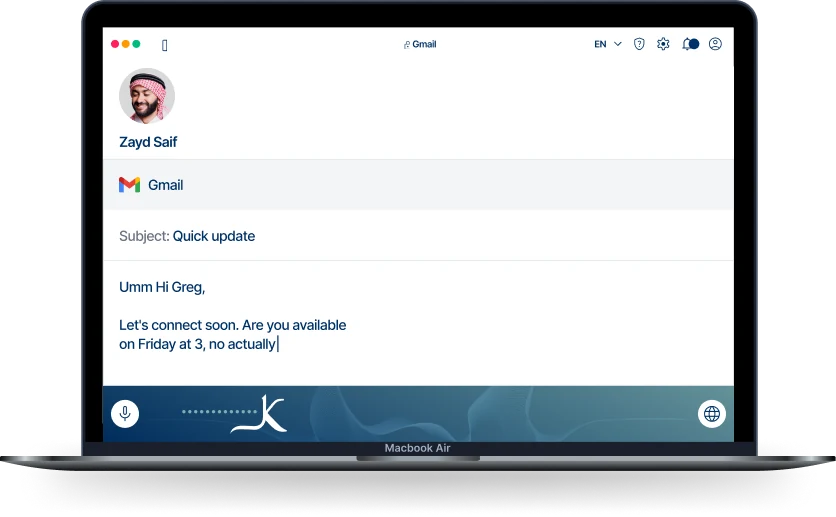
See your words transform into polished text in real time.

Gmail
Subject: Quick update

Hey Greg, Let's connect soon. Are you available on Friday at 3, no actually 4?

0:07 1x
Your region. Your voice

Switch languages without breaking your flow

Speak Arabic and English naturally in the same conversation.

Kalam understands both seamlessly.

100+ Supported languages

Real-time Arabic transcription

Intelligent Translation engine

Fine-tuned for Gulf Arabic speech

Smart Grammar Speak. Kalam corrects.

English USA
العربية KSA
Anytime. Anywhere

Works wherever you work

Gmail, Slack, Notion, Teams, ClickUp, VS Code, Google Docs, and more—Kalam is always one shortcut away.

WhatsApp
Slack
Microsoft
Google
Outlook
Adobe
Notion
Facebook
Claude
Others
Try Kalam for Free
Kalam running in Gmail on a MacBook
Zayd Saif
Gmail
Subject: Quick update
A hand holding a phone running Kalam
Key features

More than dictation.
An AI writing assistant.

Bilingual · live

One conversation,
two languages.

Speak Arabic, English, or both in the same breath. Kalam follows every switch — then fixes and formats the whole thing.

English العربية
Kalam — Live transcription
English · العربية ·
0%

Your voice profile

Discover how you use your voice

Unlocks in 2K words

0%

Words Per Minute

Speak Faster, Work Smarter

Track your speaking speed and improve productivity with real-time voice performance insights.

May 5, 2026

Email

3:32 PM

Per our discussion, the revised marketing plan is attached. Please review it, and I am available to meet next week to discuss.

754 words

3 mins

Sheets

10:02 AM

Following up on the design mockups, I have included the updated designs. Let me know if you would like to schedule a review session.

893 words

1 min

Classroom

10:02 AM

Following up on the design mockups, I have included the updated designs. Let me know if you would like to schedule a review session.

893 words

1 min

Recent Activities

Stay Updated Instantly

View recent transcriptions, edits, snippets, and workflow actions in one organized timeline.

Words dictated

128.4K

18%

vs last 7 days

Time saved

9h 42m

22%

vs last 7 days

Average speed

146 wpm

7%

vs last 7 days

Insights

Understand Your Workflow

Monitor usage, productivity patterns, and voice activity with intelligent performance insights.

Formal

Hello, are you available for lunch tomorrow? Shall we meet at 12 if that works for you?

Casual

Hey, are you free for lunch tomorrow? Let us do 12 if that works for you.

Very casual

hey are you free for lunch tomorrow? let us do 12 if that works for you.

Styles

Personalize The Way You Write

Switch themes and adapt writing tones to match your workflow and communication style.

Snippets & Shortcuts

Quick save. Instant reuse.

Save frequently used responses and expand them anywhere.

Personal Dictionary

Your words, your meaning.

Teach Kalam names, phrases, and industry-specific terminology.

Cross-Platform Flow

Work seamlessly everywhere.

Use Kalam across desktop and mobile without losing context.

Language tools

Speak rough.
Send it polished.

Grammar autocorrect
Tense, agreement and word choice fixed the moment you speak.
Mail — Compose
To: greg@northwind.co
Smart AI Rewrite
Summarize, formalize or translate in one tap — no app-switching.
Kalam — Rewrite
Your dictation
hey greg, can we move our friday sync to 4 instead of 3? lmk!
Pick an action above — Kalam rewrites in place, without leaving the field.
Inserts into any app
Voice commands
Edit hands-free with simple voice commands.
Notes — Dictating
Language
Testimonial

See how teams communicate faster with Kalam

  • Gharam H.

    Project Manager

    Kalam helps me leave clear Linear feedback without stopping to type, keeping projects moving faster throughout busy workdays.

  • Mostafa R.

    Software Engineer

    Kalam makes AI conversations feel natural, helping me share context faster and turn voice notes into clean text.

  • Habeba E.

    Project Manager

    Kalam lets me think out loud, capture ideas instantly, and move through my workday with much less typing.

  • Omar A.

    Software Engineer

    Kalam saves coding time by helping me explain context clearly to AI tools and get better output faster.

  • Mayar E.

    Marketing Coordinator

    Kalam speeds up marketing work, especially Arabic-English dictation, so content drafts become easier every single day for me.

  • Sief H.

    Software Engineer

    Kalam turns technical thoughts into clear issue descriptions quickly, and Arabic-English support has improved my daily productivity greatly.

  • Mahmoud A.

    Software Engineer

    Kalam boosts my productivity with smooth speech recognition, helping me handle tasks faster while staying focused every day.

  • Ahmed G.

    Web Developer

    Kalam helps me write documentation and Slack messages faster, then clean up wording with AI Rewrite before sending.

  • Karim A.

    Engineering Team Lead

    Kalam helps me capture thoughts much faster, making it an essential part of my daily workflow now overall.

Flexible plans

Choose the right Kalam plan

Save 20%

For individual

Kalam Basic

Free

  • 3,000 words per week
  • Support for English and Arabic
  • Translation support for 8 languages
  • Voice commands
  • Dictionary and snippets
Most popular

For individuals and teams

Kalam Pro

$12 per user/mo

billed annually · $144 per user/year $180 Save $36 · 20% off
  • Everything in Basic
  • Unlimited words per week on all devices
  • Team collaboration features
FAQs

Quick answers to common questions